2026-03-10
Discussion
 pring combo contest
Hello,
On this discussion topic, you can talk about the Golden Apple + the Helios' Ray combo contest.
You can practice posting images, ask questions, share your feedback, and ask for help.
To participate in the contest, you need to go to the Contest topic and post your combo submission there.
 Submit your entry on the Contest topic until
 2026-03-26 11:00.
Vote between 2026-03-26 11:00 and 2026-03-30 10:00.
The winners will be announced once we have the results.
The time matches the time zone selected on your account.
FAQ
↪ These are the only items you can use to participate:
↪ To participate, do I need to own the combo?
Yes, you need to own the horse combo on this server. You also need to post the link to that horse on your submission message.
↪ How does the voting phase work? If I click on the hearts before the deadline, will they count for voting?
Yes, the votes will still count.
↪ Won't the first people submitting get more votes than those who submit later?
The voting stage will last for a few days, and we will also send a private message to remind everyone to vote, so it shouldn't be the case.
↪ I don't know the names of the creations and the authors of the coat or background. How do I find this out?
If you already have a horse with the combo, go to its page and click on their Golden Apple and Helios' Ray. It will show you the name of the creation and the author.
↪ I posted my submission message on the contest topic, but I forgot to add something. Can you correct it?
Yes! Please post the corrected message on this discussion topic. We will then copy it and use it to edit your participation message on the other topic, so it shows correctly.
↪ I want to change the coat/landscape from my participation, so it better fits the theme. Can you edit my message?
If your message already has votes, we can censor it so that you can post a new one. If it doesn't have votes, we can edit it.
↪ I would like to delete my submission and re-enter. Is that possible?
Yes, as long as the voting phase has not begun. Please let us know on this discussion topic that you would like us to censor your message. After it's censored, you will be able to submit a new one.
↪ I noticed that my participation message was censored. Why?
If your message doesn't follow the participation rules, it will be censored. The Howrse team will leave a message on the topic informing you of that. If you post a message on the discussion topic correcting it, the team can copy it and use it to correct your participation message. Then, your message will be uncensored.
How to upload your image
Click to display
↪ You can either take a screenshot of your horse or use the in-game download option.
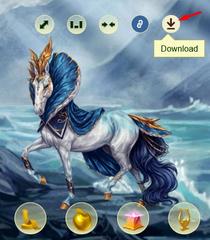
↪ If you use the download option, go to your horse's page and click on the download icon. The image will then be saved on your device.
↪ Upload the image to a website of your choice: Postimage, for example.
Please avoid using Imgur, as players living in the UK won't be able to see those images.
↪ Some websites allow you to resize the image, so you can make it smaller to fit nicely on the forum.
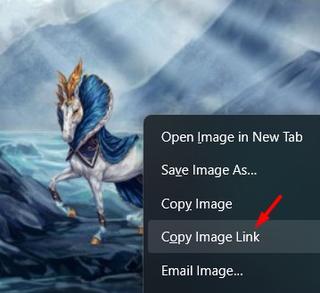
↪ After it's uploaded on the website, right-click on the image and click on "Copy Image Link", like this:
↪ On Howrse, click on the "Add an image" button and paste the link there:

↪ You can use the preview feature to preview your message before posting it.
Have fun!
The Howrse Team
- TuesdayHello! Could someone delete my first post on the contest page? It didn't fit the contest theme! I've also accidentally posted that same post in here, too. Could you please delete that, too? Thanks!
- TuesdayHi, I can't upload an image repeatedly because it's supposedly in the "wrong format."

Could someone please advise me on the size and which link to select? I'm using Postimage. - Tuesdayaelin galathynius wrote:
Hi, I can't upload an image repeatedly because it's supposedly in the "wrong format."
Could someone please advise me on the size and which link to select? I'm using Postimage.
Postimage will give you several different options to choose from on how to share. Copy the one next to "direct link". The url should end in .png
Then paste that into the "add an image" shortcut box here in the forum. The forum "preview" option should then show the image before you confirm to post the message - Tuesdayᴱᵗᵉʳⁿᵃˡ ᴮˡᵃᶻᵉ wrote:
Hello! Could someone delete my first post on the contest page? It didn't fit the contest theme! I've also accidentally posted that same post in here, too. Could you please delete that, too? Thanks!
Hello,
Done! And I have also added to your message the name and link to your horse's public page, as it was easy to find on your account.

